Use a custom domain with AppointmentGuru
If you have a custom domain (e.g.: example.com) that you own, you can point this to your AppointmentGuru hosted website so that if someone goes to example.com it will load your free AppointmentGuru website.
Warning: Here there be dragons! This is an advanced topic, so feel free to contact AppointmentGuru Support if you have any questions - we'll be happy to help get this set up for you.
You will need the following things before you start:
- Access to the DNS of your domain, our example below uses Cloudflare.
- A free AppointmentGuru website (e.g.: example.appt.guru).
Steps to follow:
1. Contact AppointmentGuru to route your domain to your AppointmentGuru website
Please email our support team and tell us which domain you would like to point at your website. eg: Please point example.com to example.appt.guru.
2. Set up a website and DNS on CloudFlare
Set up your website:
- Login to CloudFlare and click on websites from the sidebar, click add site.
- Enter the name of your website (eg: example.com) and save.
- Choose the plan that you would like to use (the free plan should be fine).
- Cloudflare will import any existing DNS records to your account.
Configure your DNS
To point your domain (example.com) to AppointmentGuru, you need to create an A record that points to 46.101.71.132:
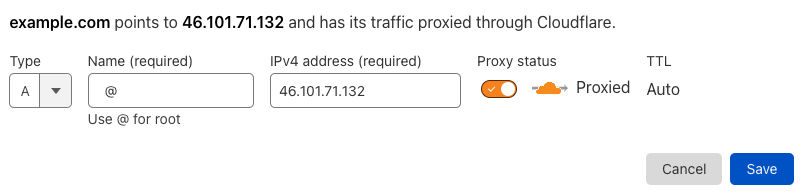
- Once you have created the A record above, click continue.
- Follow the instructions from Cloudflare on how to change your nameservers.
Once you've completed this step, CloudFlare will guide you through some optimization options, you can turn all of these on as these will make your site load faster and are compatible with the sites generated by AppointmentGuru.
You will now need to wait as your domain registrar updates your nameservers. Cloudflare will send you an email once your nameservers have successfully been updated.




 Courses
 Topics
 FAQ
FAQ